
Product Enhancements
Account View Enhancements
Summary Tab
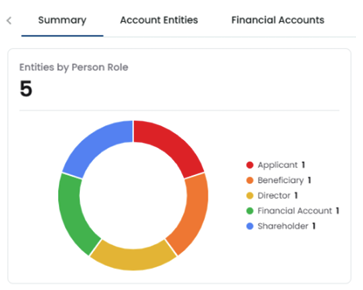
A new Account Summary tab has been added to the Account View and will now be the landing page
when viewing an account. The tab includes an Account Entity Widget displaying a Doughnut graph
that breaks down all account entities by role type, with the total entity count displayed at the top.
Example below:
Additional summary information is in development and will be added to the summary tab in future
releases.
Periodic Review Tab
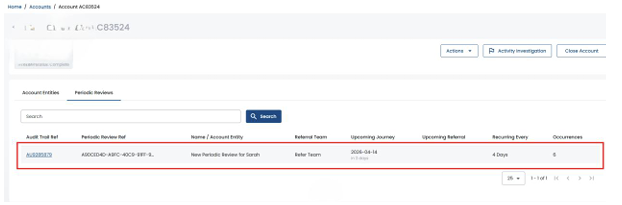
A new Periodic Review tab has been added to Account View, displaying a list of all Periodic Reviews
for entities within the account.
The list supports search, filtering, and pagination, showing fields including Audit Trail Reference,
Periodic Review Ref, Name/Account Entity, Referral Team, Upcoming Journey, Upcoming Referral,
Recurring Every, and Occurrences.
Periodic Reviews are now correctly linked to their Account, whether triggered manually from Single Application View or automatically via a Journey decision matrix.
Financial Transaction Enhancements
Enhancements have been made on the financial transactions tab: Effective date & time and Account holder columns now have sorting abilities on the column. Account holder is also now included in search functionality.
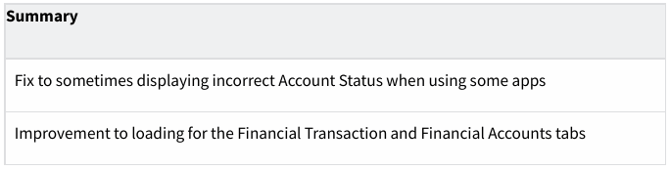
Other Account View Improvements / Fixes
Activity Investigation (ACTI) - Enhancements
FinCEN Report Improvements
The FinCEN/SAR report form now auto-saves at regular intervals to prevent data loss when a user's
session expires during a long form-filling session.
Copy-and-paste behaviour in Report forms has also been fixed to ensure pasted date-of-birth values conform to the expected FinCEN form date format.
SLA Indicators
SLA breach counts are now displayed on the Activity Investigation queue alongside existing case counts, covering the Investigations, In Progress, Awaiting, Unassigned, Investigations Closed, and
Investigations Submitted categories.
Journey Configuration & Email Assignment
A configuration panel for Email Assignment has been added to the Activity Investigation settings,
allowing administrators to configure how investigation assignments are communicated by email.
The Journey selection on the Activity Investigation configuration page now correctly filters to show
only relevant journey types.
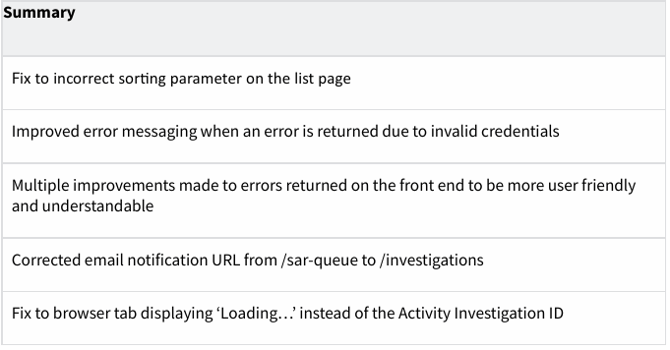
Other Activity Investigation Improvements / Fixes
Single Application View (SAV) Enhancements
Videos and Task Lists
Viewing videos can now be supported within the platform, in addition to existing document formats.
Checkbox inputs in task lists are now mandatory for internal task lists, users must check each item
before proceeding.
Viewing Permissions on Single Application View
Permissions now only require Referral Read (and to be part of assigned Referral team) or Audit Trail
Read to view the full content of their respective notes and documents on the record.
Before this change to the permissions and the content was not displayed for read permissions, this
has been implemented to ensure documents and notes can be viewed, and the record can’t be
actioned. Documents and notes will remain segmented (e.g. Audit Trail Notes vs Referral Notes),you will be able to view all notes and documents on the record if you have Referral Read (and to be part of Referral team where Referral is assigned) and Audit Trail Read permissions.
Notes Character Limit
The character limit for Notes has been increased from 1,024 to 20,000 characters across all locations that use notes, including SAV (Referral, Audit Trail) and Activity Investigation.
PDF Download Improvements
Performance improvements have been made to the PDF download, especially where there are many journeys required in the document.
The format has also been improved by providing the application information in a tabular format. In order to support panels such as notes there are multiple rows displayed.
It is also now possible to password protect a PDF download as a non-mandatory option.
Finally, we have made the addition of the LexisNexis® Risk Solutions logo and a ‘Confidential’
label.
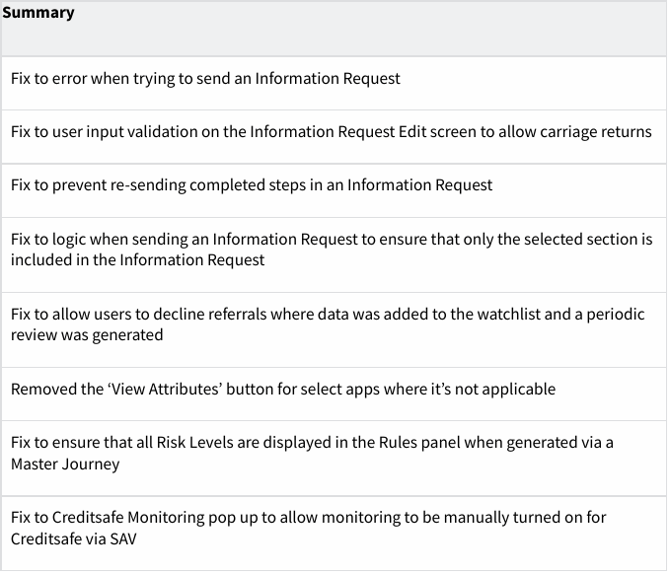
Information Requests and Other Improvements / fixes
Strategy Page Enhancements
Rulesets Table View & Filtering
The Rulesets page now supports filtering by Journey Type, allowing ruleset administrators to narrow down large lists to find relevant rulesets quickly. The Information Requests page has also been extended with additional filter support, including filtering by Journey and by ad-hoc status.
Rules Table View
The Rules page has been improved from its previous card-based layout to a table-based layout with full feature parity, including sortable columns, filter controls and field visibility persistence. Rules can now be filtered by Ruleset and sorted across multiple fields including reference and
name.
Email Templates Table View
The Email Templates page has been improved from a card-based layout to a table-based layout with sortable columns, customisable field visibility, and filter controls. Filters now support date range, system, and type filtering, with dynamic sorting across all columns.
Information Requests Table View
The Information Requests page has been improved from its card-based layout to the standard
table-based layout. The page supports keyword search and can be sorted by ad-hoc status to allow
users to quickly identify ad-hoc information requests.
SSO
Organisation Switcher
Users with access to multiple organisations can now switch between them within the platform without leaving or refreshing the page.
A dropdown has been added next to the existing profile menu, displaying the current organisation when closed and all available organisations when opened. The switcher is not visible to users who
only belong to a single organisation.
Integrations
Charity Commission added to Company Search Portal
Charity Commission has been added to the company search dropdown on the Portal, allowing users to search for companies registered with the Charity Commission for a smoother onboarding experience. Both a backend API and frontend implementation have been delivered.
Other Bug Fixes
